

The Digital Glovebox: How to Manage Your Repairs via the Endurance Customer Portal
When your car breaks down, the hardest part isn’t always the repair itself, but rather it’s knowing what to do next. The Endurance Customer Portal is designed to solve that problem by giving you centralized access to your auto warranty or vehicle protection plan details, claim eligibility information, and support tools in one secure place.
Think of it as your digital glovebox. From requesting roadside assistance to tracking claim updates, the portal keeps you informed and in control throughout the entire repair process. Here’s how it works and how it can help you save time and reduce stress when it matters most.
How the Endurance Portal Supports Every Stage of a Repair
When something goes wrong with your vehicle, your instinct may be to start calling repair shops, roadside assistance, customer service, or somewhere else. Before you do any of that, though, you should prepare.
Setting up your account in the Endurance Customer Portal allows you to quickly access important contact numbers and contract details in the event of a breakdown. In the portal, you can:
- Request roadside assistance
- Review your coverage details and deductible amount (if applicable)
- Track claim status and approvals
- Upload or verify required information
- See real-time updates related to your repair
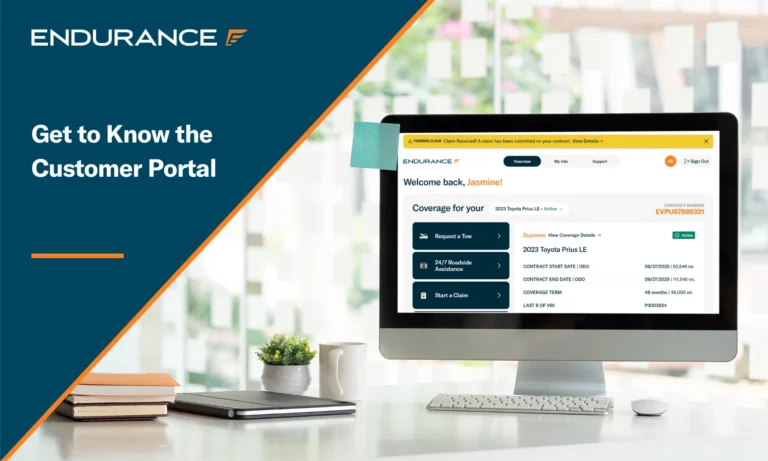
Starting with the first step, log in to the Endurance Customer Portal by clicking “Account Sign-in” at the top of our website (EnduranceWarranty.com). This will lead you to the “Overview” section. Near the top of that page, you will see two more options to assist you if you break down: “Request a Tow” and “24/7 Roadside Assistance.”
Serving customers around the clock nationwide, roadside assistance can provide services including changing a flat tire using your spare, jump-starting your vehicle, delivering fuel to your location, and dispatching a locksmith. Alternatively, if your vehicle is fully broken down, you can call the listed number for a tow to the nearest licensed repair shop or even a dealership. Endurance will even cover towing expenses of up to $100 per occurrence, depending on your contract terms.
With your car on the way to the shop, don’t close out of the Endurance Customer Portal yet. Before authorizing any repairs, it’s crucial that you know what your plan covers so you can determine whether the breakdown falls under your extended warranty or vehicle service plan. Luckily, the portal also gives you a succinct summary of your plan.
The easiest way to see all details of your coverage plan is to switch over to the ‘My Info’ tab at the top of the page. Under this page, specifically under the ‘Linked Contracts’ subsection, you’ll be able to see your coverage details by clicking into your plan. This will outline the specifics of your auto protection plan, including whether you have comprehensive coverage, in addition to the parts that are covered by the plan.
By confirming covered components, understanding limitations or exclusions, and knowing what documentation may be required when visiting an ASE-certified mechanic or repair shop, you can move forward with confidence. Also, don’t forget to have the repair shop contact Endurance before they start on any repairs. Pre-authorization is typically required before covered repairs are performed.
On that note, once the repair claim has been initiated and approved by Endurance, you can check its status at any time in the Customer Portal. This means that instead of waiting for callbacks or updates, you can see whether your claim is pending, approved, or requires additional information in real time.
What Slows the Repair Process Down
Many delays aren’t caused by the repair itself. They happen because of communication gaps or missing details during the process. Some of the most common slowdowns include:
- Not taking advantage of the Customer Portal early. Waiting to log in until after phone calls or shop visits can delay the start of your claim.
- Relying solely on phone updates. Phone calls may mean hold times or missed messages, while portal updates are always available to enhance the customer experience.
- Missing or incomplete information. Without key details, approvals and processing can stall, even at a certified repair shop.
- Unclear repair shop communication. When information isn’t centralized, updates can get lost between parties, including details of your extended warranty or vehicle protection plan.
Using the Endurance Customer Portal early may help reduce common delays by centralizing all your documentation and communication in one place.
What to Have Ready to Keep Things Moving Forward
A little preparation will go a long way when a mechanical breakdown happens. Having the right information ready to go when you log in to the Customer Portal can help streamline assistance and claim processing. Before opening your phone or computer and logging in to start the claim process, consider having the following ready:
- Vehicle information, including the year, make, model, and mileage
- Your current location (particularly if you need to request roadside assistance)
- The details of the repair shop you have taken your vehicle to
- A brief description of the issue that is afflicting your vehicle
- Any recent service or history of repair for your vehicle
Providing accurate and complete information upfront, whether for a major mechanical issue or a simple windshield repair, will help to reduce back-and-forth while also helping everyone involved move more efficiently.
Where to Go and Who to Contact When You Breakdown
For most repair-related needs, the Endurance Customer Portal should be your first stop, as it will have all the contact information you need. Both tow truck and roadside assistance numbers are available, not to mention customer service support numbers to assist with your needs. You should use the portal whenever you need to request roadside assistance, check a claim status, review coverage details, or track updates related to your repair.
Customer support from Endurance Warranty is available if you need personalized assistance or have questions that can’t be resolved through the FAQs in the portal as well. However, starting with the portal may allow you to access information without waiting for phone support about your vehicle service contract.
A Repair Experience Built on Peace of Mind
Vehicle repairs are never convenient, but they don’t have to feel overwhelming. The Endurance Customer Portal is designed to provide centralized access to key contract information, tools, and repair updates right at your fingertips. The portal will also outline any standard perks, such as roadside assistance or rental car reimbursement, as well as your Elite Benefits, if you have them through your Endurance plan.
By using the portal as your personal digital glovebox, you can manage your extended car warranty and repair journey in one place, stay informed at every step, and move forward with confidence instead of guesswork. When something does go wrong under the hood, knowing exactly where to go and what to do will make all the difference.
To learn more or get help with your Endurance Warranty Services contract, contact our team at (800) 253-8203. You can also shop our online store to see your price and plan recommendations right away.









The Endurance blog is powered by a team of automotive experts, customer care professionals, and industry writers dedicated to helping drivers make smarter decisions about vehicle protection and ownership. From coverage insights to car care advice, our content is designed to inform and support every stage of the driver journey. For press inquiries, please contact [email protected].